

Tailscale integration is currently supported for Linux workloads only.
Configure Tailscale
Use the Tailscale admin console to create the client ID that Namespace will store.Create an OpenID Connect trust credential
Open Tailscale’s Trust credentials page,
select Credential, then choose OpenID Connect.
Configure Namespace as the issuer
Configure the credential to trust Namespace’s OIDC issuer: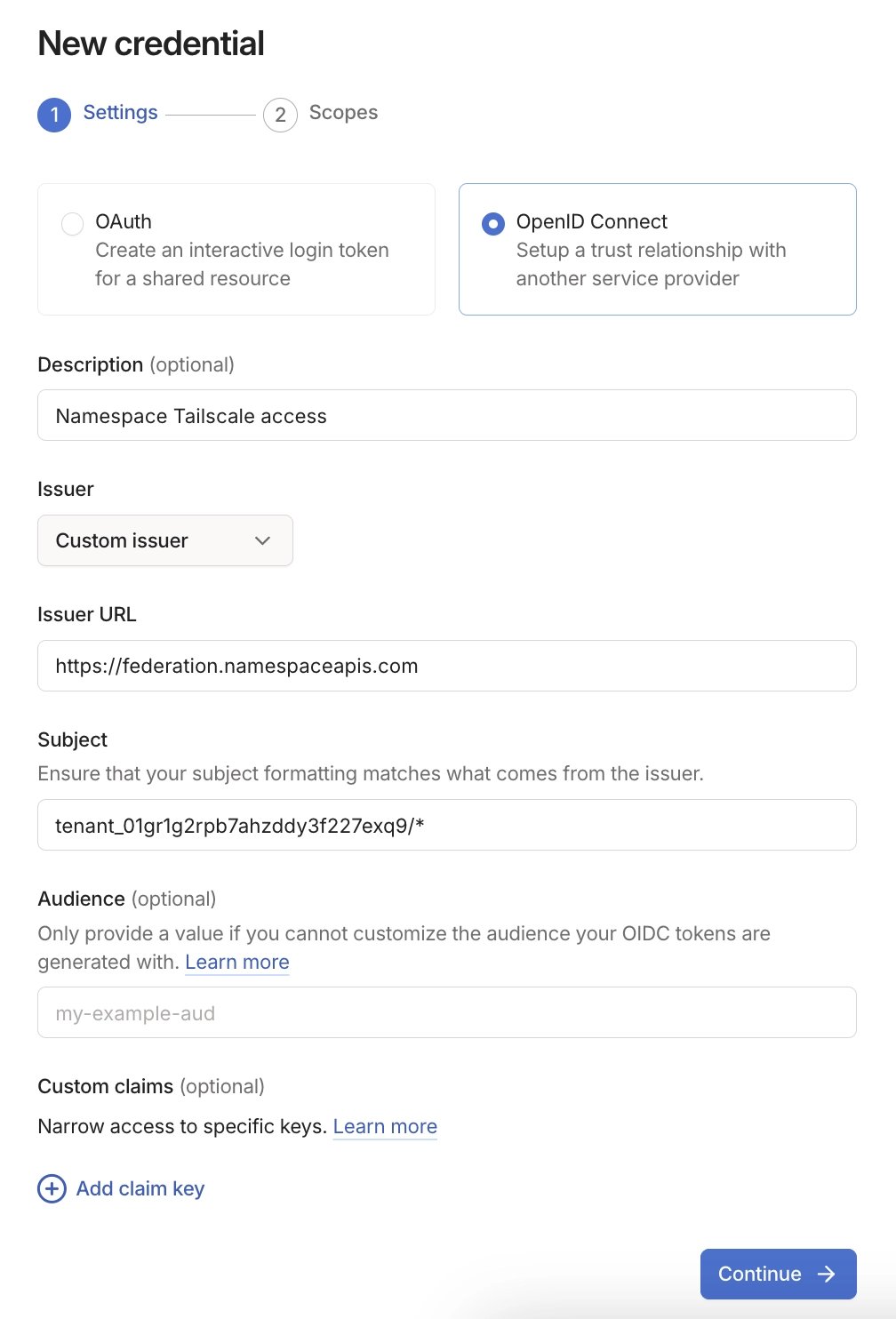
- Issuer:
Custom issuer - Issuer URL:
https://federation.namespaceapis.com - Subject:
<workspace-id>/*
<workspace-id>/<instance-id> for workloads.You can find your workspace ID in Workspace settings.Grant node-registration access and tags
Grant the credential the ability to register nodes and select the tags that Namespace workloads are allowed to advertise.
The tags you save in Namespace must be a subset of the tags allowed here.For Namespace-managed node registration, enable the scope that allows auth key generation for node joins: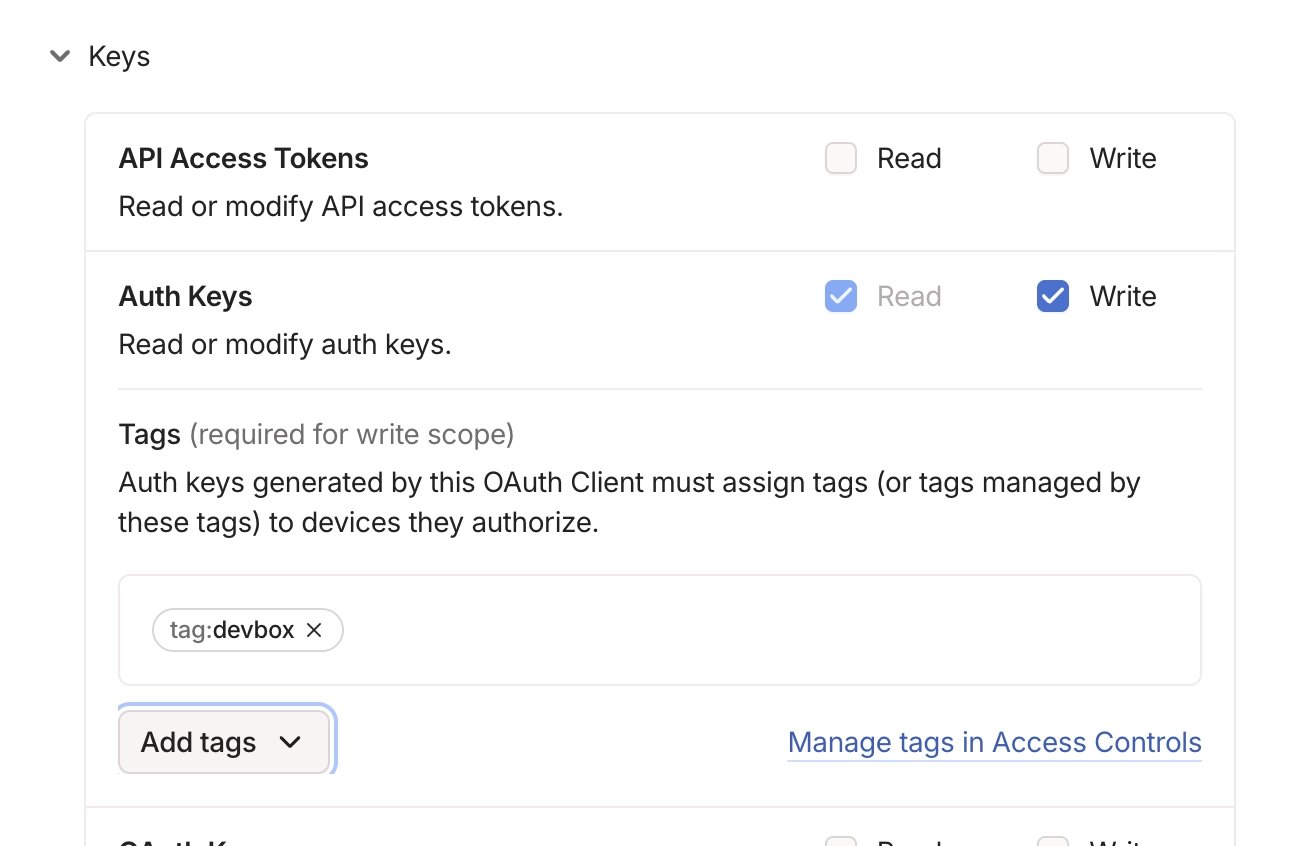
- Scope:
auth_keys - Tags: every tag you plan to pass through
nsc integrations tailscale set --tag ...
api.tailscale.com/<client-id>.Configure the integration in Namespace
Once you have the Tailscale client ID, store it in your Namespace workspace with a friendly name. You can do this from the Integrations page in the Namespace console, or with the CLI:corp.
The stored tags are the tags Namespace passes to tailscale up --advertise-tags=... when the workload joins your tailnet.
You can pass tags either multiple times or as a comma-separated list:
Magic DNS
You can enable Tailscale Magic DNS so that workloads can reach other devices on your tailnet by their machine name. To enable it, pass the--enable-magic-dns flag:
Inspect And Remove Specs
List the currently configured Tailscale specs in your workspace:How Namespace Uses The Spec
When a Namespace workload uses one of these named specs, Namespace resolves the saved client ID and tags, issues a short-lived ID token fromhttps://federation.namespaceapis.com, and joins Tailscale with:
- You keep long-lived Tailscale secrets out of Namespace
- Each workload authenticates with a short-lived Namespace-issued OIDC token
- Tailscale authorization stays scoped to the workspace and tags you configured above
- Devices are registered as ephemeral and auto-removed after going offline
Use with GitHub Actions
You can connect your CI runners to your Tailscale tailnet by adding thetailscale.spec feature
to your runner configuration. This lets your GitHub Actions workflows access private services
on your tailnet (e.g. databases, staging environments, internal APIs).
- With runner profiles
- With runner labels
Append the
tailscale.spec feature to your profile name:corp with the name of the Tailscale spec you created with nsc integrations tailscale set.
See Connecting to Tailscale for how
this feature fits alongside other runner settings.
Use with Devboxes
Devboxes support Tailscale out of the box. You can enable it in two ways:- Workspace defaults: workspace admins can select a Tailscale spec on the Devboxes defaults page so every new Devbox automatically joins your tailnet.
- Per-devbox configuration: add the integration to your Devbox YAML config:
Notes
- Tailscale integration is currently supported for Linux workloads.
- The named integration only stores the client ID and tags; it does not store a Tailscale client secret.
- If Tailscale rejects the advertised tags, check that the same tags are allowed on the Tailscale trust credential.
- For more background on Namespace-issued OIDC tokens, see Workload Federation with OpenID Connect.