Tailscale Integration: Secure Access for Every Workload

Cloud workloads create a network access problem that's easy to underestimate. A CI job that needs to run database migrations, a Devbox that needs to hit an internal API, or a build that pulls from a private artifact registry. These all need to reach infrastructure that isn't publicly exposed. Common answers can be punching holes in firewalls, managing IP allowlists, or routing traffic through a VPN gateway.
Tailscale helps you connect your services in a sane and manageable way. Each node authenticates with your identity provider and connects directly to other nodes. When a Namespace workload joins your tailnet, it gets the same private network access as a developer's laptop or a server in your datacenter. It can reach your internal services by hostname, and your team can reach it directly if needed.
How to connect Namespace + Tailscale
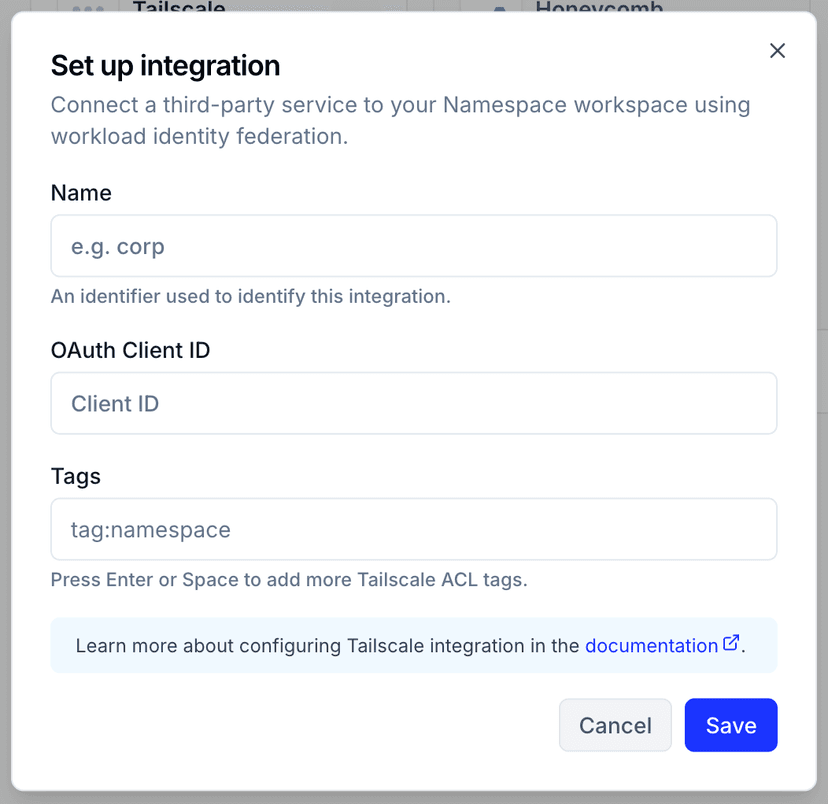
Connecting Namespace to Tailscale takes just a few minutes. Here's how to set it up:
- In the Tailscale admin console, create an OIDC credential that trusts Namespace's OIDC issuer.
- In your Namespace workspace, go to Integrations and store the Tailscale client ID with a name and the tags workloads should advertise.
- When creating a workload, select that integration spec.
Workspace admins can set a default Tailscale spec so every new workload joins the tailnet automatically without developers needing to configure anything themselves. For more information, view the Tailscale Integration documentation.
How authentication works
When a Namespace workload boots, we issue a short-lived OIDC token and use it to register the node with your tailnet. No Tailscale auth key or client secret is stored anywhere.
Tags and ACLs work the same as for any other tailnet node. For example, tag a workload tag:devbox and your existing ACL rules apply to it automatically.
Devboxes
A Devbox with Tailscale enabled joins your tailnet on first boot and behaves like any other node on your private network. Here's what that opens up in practice.
Reach your real infrastructure. Without Tailscale, a cloud dev environment has no path to anything behind your network perimeter. You end up mocking internal services, manually syncing fixtures, or running against a stripped-down setup that doesn't reflect staging. With Tailscale, your Devbox can reach anything your ACLs permit: your staging Postgres instance, an internal auth service, a private artifact registry.
Access dev servers without port forwarding. If you're running a local dev server inside your Devbox, a web app on port 3000, a Storybook instance, or an API server, Tailscale makes it directly reachable from your browser on any tailnet device. No devbox port-forward command running in a separate terminal or tunneling setup needed.
Share a running environment with your team. Because the Devbox is a node on your shared tailnet, other team members can reach it too, subject to your ACL rules. This is useful for pair debugging, reviewing a running app before it's deployed, or letting a teammate reproduce an issue in your exact environment.
The Devbox shows up in your Tailscale admin console as a normal node and stays reachable at a stable address across sessions. For more information on how to use Tailscale in Devboxes, read our documentation.
CI runners
CI runners face the same network access problem as Devboxes. A runner that can't reach your private infrastructure means integration tests run against mocks, database migrations have to be handled separately, and deployments to private servers require either exposing SSH ports or maintaining self-hosted runners. With Tailscale, a runner joins your tailnet as an ephemeral node for the duration of the job, gets whatever access your ACLs permit, and is automatically removed when the job finishes.
Here's what that makes possible in practice.
Integration tests against real infrastructure. Instead of mocking your internal services or standing up a separate test environment that drifts from staging, your CI job can connect directly to the real thing. A test suite that hits your internal auth service, a staging database, or a private API that will give you accurate results.
Database migrations against private databases. Running migrations from CI normally means your database has to be reachable from the public internet, or you're maintaining a self-hosted runner with network access baked in. With Tailscale, a GitHub-hosted runner joins your tailnet, runs the migration against your private database, and disconnects. The database never needs a public endpoint.
Deployments to private infrastructure. If you're deploying to servers that aren't publicly exposed, like on-premises machines, private cloud instances, or internal Kubernetes clusters, Tailscale gives your CI runner a direct path. The runner joins your tailnet, deploys over SSH or kubectl, and the ephemeral node is cleaned up automatically when the job completes.
Pulling from private artifact registries. Build jobs that depend on internal packages or private container images need network access to wherever those are hosted. Rather than making your registry public or managing network allowlists for CI IP ranges, put your registry on your tailnet and let your runners reach it like any other node.
Access control works the same way as everywhere else in your tailnet. Tag your runners tag:ci, define what that tag can reach in your ACLs, and runners get exactly that access.
Summary
Tailscale integration gives every Namespace workload, Devboxes and CI runners alike, secure access to your private infrastructure without public endpoints, VPN bottlenecks, or stored credentials. Workloads join your tailnet automatically via short-lived OIDC tokens, inherit your existing ACL rules, and are cleaned up when they're done. The result: dev environments that connect to real staging infrastructure, CI pipelines that run migrations and integration tests against private databases, and deployments to internal servers, without punching holes in your firewall or managing IP allowlists.