Setting up Claude Code in a Devbox

The "AI coworker" framing is intuitive but a bit misleading. A coworker sits next to you, shares context, and works on their own machine. Handing work to a contractor is a different dynamic: you define the task, they execute it, and you get the results back, usually without much real-time back-and-forth.
That distinction matters when thinking about access. You wouldn't hand a contractor your laptop for a job that only needs a specific tool. Claude Code works the same way. It's an agent you can delegate engineering tasks to (refactoring a module, writing tests, tracking down a bug), but it has access to whatever environment you run it in.
That's why running Claude Code in a sandbox matters. Code sandboxes are a well-established solution to limit what Claude Code has access to: isolated environments where code can run freely without reaching anything outside. Namespace Devboxes build on that idea. A persistent, cloud-hosted sandbox that starts up in seconds, connects to your IDE, and comes with Claude Code already installed.
Setting up a Claude Code in a Devbox
A Devbox is a persistent, cloud-hosted Claude Code sandbox that spins up in seconds, connects to your IDE, and comes with Claude Code pre-installed. Claude runs inside of it, while your workstation’s resources like the home directory, SSH keys, .env files, and production credentials stay out of reach.
Let’s walk through the steps to use a Devbox as a Claude Code sandbox:
Step 1: Create a Namespace account
Sign up at cloud.namespace.so and then enable the GitHub integration by visiting Devboxes, clicking Connect Organization, and following the instructions.
Step 2: Install the CLI and login
curl -fsSL get.namespace.so/devbox/install.sh | bashdevbox auth loginStep 3: Create a Devbox
To create a Devbox run the following command, replacing github.com/your-org/your-repo with your repo slug. This will check out your code into the Devbox and set up permissions so you can push & pull.
devbox create --checkout=github.com/your-org/your-repoYou will be prompted to enter a name for your Devbox. You can skip this and use the autogenerated name.

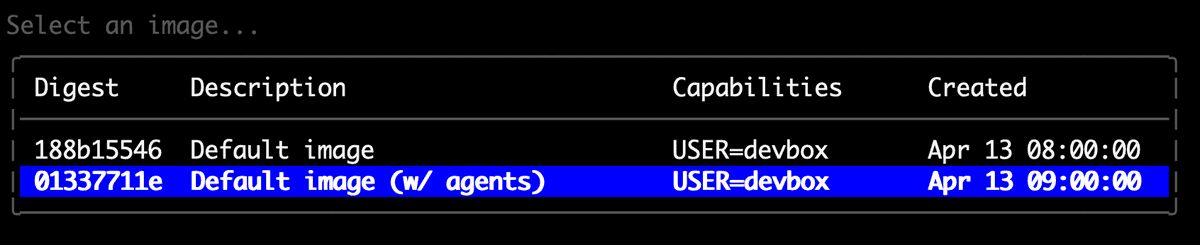
Next you will be prompted to select an image. Please select the image name Default image (w/ agents) which comes with Claude Code pre-installed:
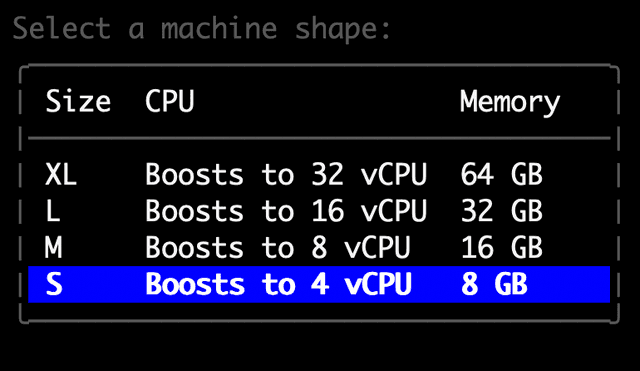
Finally, you will be prompted to select a machine size:
Once your Devbox has finished being created, you are ready to connect to it and use Claude Code.
Running Claude Code in your Devbox
Now that your Devbox is ready, let’s connect to it through SSH:
devbox ssh clock-salt-5kcrOnce you’re connected launch Claude and follow the prompts to authenticate:
claudeFrom here, delegate work the same way you would locally. The difference is everything stays contained inside the Devbox and you don’t need to walk around with your laptop open.
Continuing Sessions
One common pattern: you start a Claude Code session locally, get pulled into a meeting, or need to close your laptop and head out. With a Devbox, you don't lose that context. Before you leave your local session, commit or push your working state to your repo. Then from any machine, SSH into your Devbox and pick up where you left off:
claude --continueThe --continue flag resumes your most recent conversation, including the task context, file history, and where Claude left off. This is especially useful for long-running tasks. Kick off a refactor or test suite locally, hand it to the Devbox, and check back in later.
Parallel Workstreams
Say you're working on a feature but you also have a failing test suite that needs attention and a dependency upgrade that's been sitting on the backlog. Normally that's a juggling act — you context switch, or you queue things up and wait. With Devboxes you can spin up a separate environment for each and let them all run at the same time. One Devbox is working through the test failures, another is handling the upgrade, while you stay focused on the feature. Because each environment is isolated, there's no risk of one job's changes affecting another.
Triaging and Investigating Issues
A bug comes in: users are hitting a 500 error on checkout, but only intermittently, and only in production. You need to dig in, but that kind of investigation is messy — reproducing the issue, installing debug tooling, making throwaway changes to test a theory. Doing that locally means cleaning up afterward, or worse, forgetting to. Instead, spin up a Devbox pointed at the relevant commit, and have Claude Code trace through the logs and reproduction steps. It can narrow down the likely cause and summarize what it found without ever touching your local environment. When you're done, the Devbox goes away and nothing lingers.
The bottom line
Claude Code is genuinely useful for delegating engineering work. The missing piece has been a safe place to run it. A Namespace Devbox gives you a Claude Code sandbox that's isolated by default, persistent across sessions, and ready in seconds. Delegate the work and your machine stays yours. Get started with Devboxes today.