Changelog #18


Job access levels in Github Runners
You can now control the access level granted to jobs. Three levels are available:
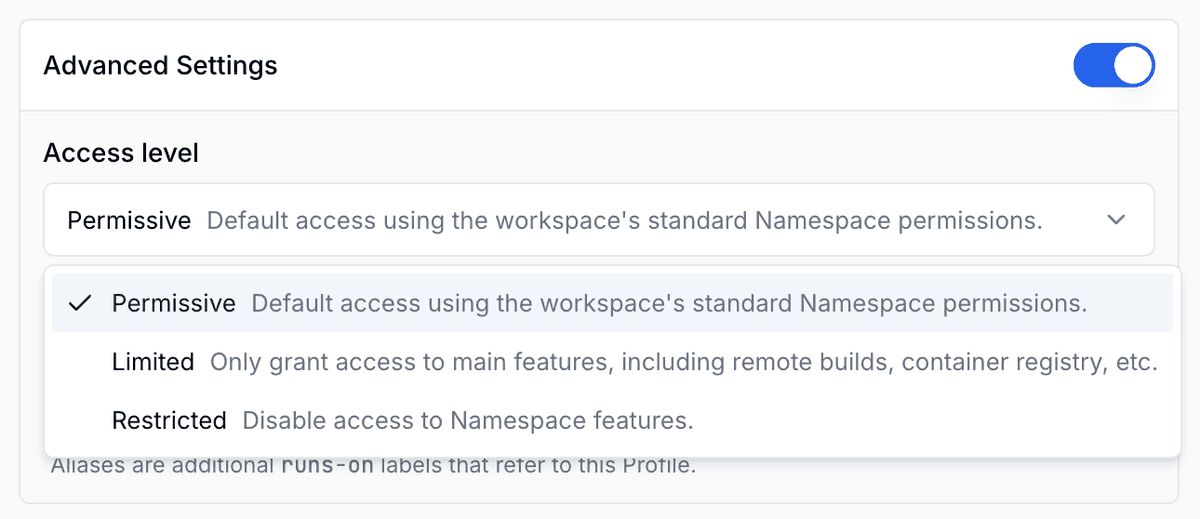
- Permissive - Default. Uses the tenant's workload permissions as-is, giving jobs full access to all Namespace features your workspace has enabled.
- Limited - Restricts access to a curated subset: remote builders, container registry, caches, and federation token issuance. Useful when you want jobs to use Namespace for builds and artifact storage, but not interact with other workspace resources.
- Restricted - Runs jobs with no Namespace permissions at all. Suitable for untrusted or third-party workflows where you want complete isolation.
Configure access levels in the Runner Profiles section of the Namespace dashboard. Each profile targets a GitHub Actions label, so you can apply different levels to different workflow groups. For example, set Limited on external contributor PRs while keeping Permissive for internal release workflows.
Nested virtualization in the public API
nested_virtualization is now available as a field in CreateInstanceRequest.ExperimentalFeatures.
Setting it to true configures the instance with access to /dev/kvm, enabling hardware-accelerated virtualization for any process running inside. Namespace automatically mounts the device into each container and sets its permissions so non-root users can use it without additional setup.
This is useful for:
- Android emulators - hardware acceleration cuts emulator startup from minutes to seconds and prevents flaky tests caused by CPU-only emulation timeouts.
- Nested VMs - run Firecracker, QEMU, or Vagrant boxes inside your CI instance for integration tests that require a real VM boundary.
- Hypervisor-based sandboxes - workloads that use gVisor, Kata Containers, or similar runtimes that rely on KVM.
Supported on linux/amd64 and Linux on Apple Silicon instances. Not available on macOS or Windows instances.
Instance Reporting
The nsc CLI has a new subcommand: nsc instance report. Given a start and end time, it streams a CSV of every instance your workspace created in that window.
Each row includes:
- Instance ID, creation time, start time (when the instance became ready), and destruction time
- Allocated CPU and RAM
- Peak CPU utilization (as a fraction of one vCPU) and peak RAM utilization
- For GitHub Actions-backed instances: job name, workflow name, run ID, run attempt, and job-level timestamps
You can narrow the output with filters on platform, machine shape, purpose, GitHub repository, branch, workflow name, job name, or runner profile. This makes it straightforward to attribute cost to a specific team, repository, or workflow type.
Use cases:
- Cost attribution - break down spend by repository or workflow to identify outliers.
- Feeding BI tools - pipe the CSV directly into a data warehouse or spreadsheet for custom dashboards.
Summary
These features give you more control over how jobs interact with your workspace, how instances are provisioned, and how you report on them. GitHub jobs can now run with scoped access levels, nested virtualization opens up hardware-accelerated emulators and VM-boundary tests in CI, and the new nsc instance report command makes it easy to pull instance activity into a spreadsheet or data warehouse.