Changelog #15


Devbox Updates
Devboxes keep getting more powerful and easier to work with. Here's what's new:
More control over your environment. You can now update a running Devbox via the Update API to change the idleness timeout or swap the instance shape without tearing down and recreating your environment. We've also added support for configuring tmux, and ship a sensible default configuration that enables clipboard management and hides the status bar.
Smarter idle detection. If files are present in /.namespace/tasks, a Devbox is now considered busy and won't idle-terminate. This means long-running background work won't get cut short unexpectedly.
Better keyboard shortcuts. Cmd+K on a Devbox now focuses on Devbox-specific actions like changing sessions, and Ctrl/Cmd+F in a terminal brings up search, the small things that add up in day-to-day use.
Sessions at creation time. You can now create sessions directly when spinning up a Devbox. We've also fixed $HOME and command handling so sessions behave as expected. Use devbox session connect --session $NAME to connect to the same tmux session as the web UI, where you can reconnect at any time and pick up right where you left off.
CLI and API improvements. A handful of additions round out this release:
devbox image listnow supports-o jsonfor machine-readable outputdevbox sshnow supports inline commandsdevbox create --fromlets you spin up a Devbox from a committed spec file.- The public API's
CreateInstancenow supportsplacementordering
Container Image Caching
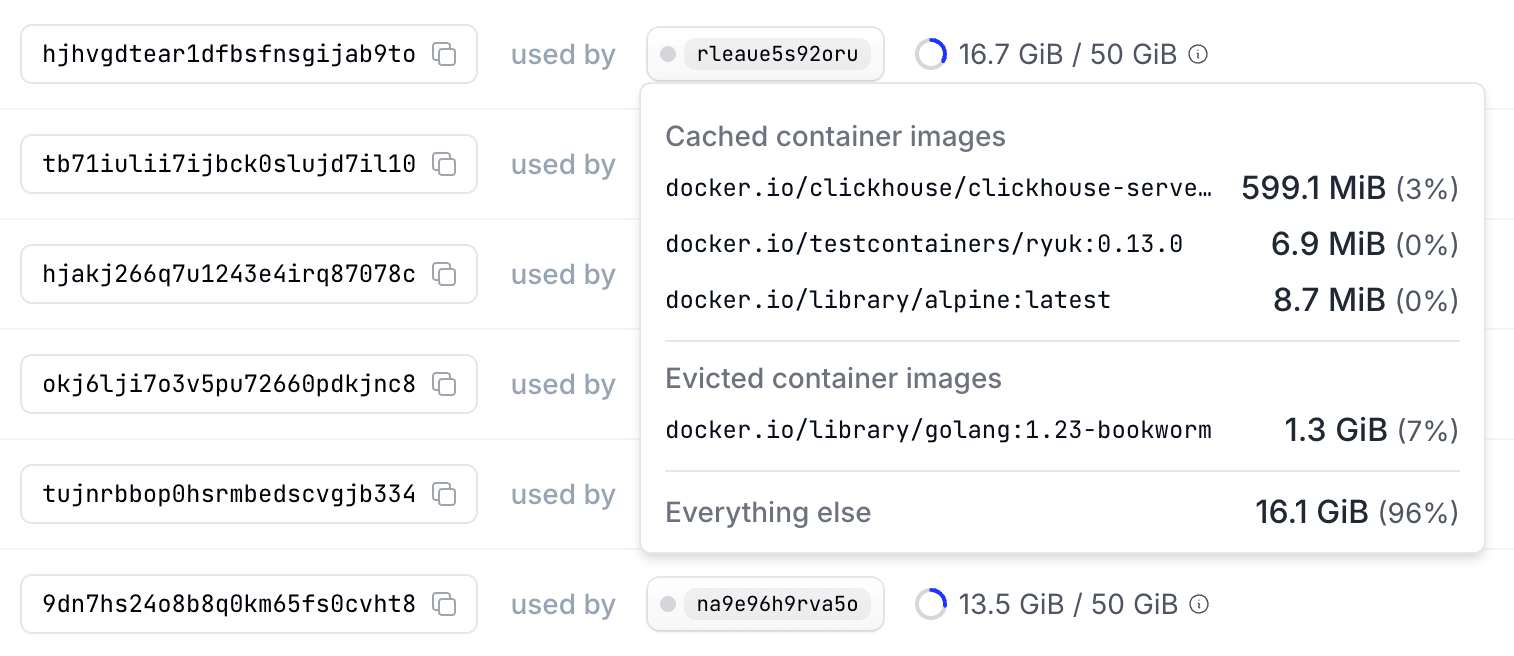
The volume detail view now shows which container images are cached and which were evicted due to capacity pressure. This gives you full visibility into your container image cache lifecycle, so you always know what's warm and what's been cleared.
We've also added an in-UI explanation of how container image caching works, making it easier to understand your cache behavior without digging through docs.
UI Improvements

The Usage Explorer now lets you slice your data more precisely. You can aggregate usage by day, month, or billing period, filter by specific months or billing periods, and filter by GitHub workflow. Whether you're tracking down a spike or optimizing spend, it's now a lot easier to get to the view you need.
Summary
The last few weeks we have focused on giving you more control and visibility across your workflows. Devboxes now give you more control over running environments without the need to tear them down and recreate them, smarter idle detection keeps background work from getting cut short, and a handful of CLI and API additions make day-to-day use a little smoother. Container image caching now surfaces full lifecycle visibility so you always know what's warm, and the Usage Explorer makes it easier to slice your data and track down spend. Check out the changelog for the full list of changes.